Autopilot vs. Copilot
Open AI Settings · Open the inbox
Supahost's AI drafts a reply to every guest message. What happens to that draft next depends on the property's mode:
- Autopilot — if the AI is confident the draft is correct, it sends it automatically. No action needed from you.
- Copilot — the AI writes the draft but waits for you to review and approve it before it goes out.
The AI evaluates its own confidence in a reply before deciding whether it is safe to send automatically. Above roughly 90% confidence it sends on its own; below that, the reply is held for review.
Autopilot and Copilot are not an all-or-nothing switch for your whole account. You can run some properties in full Autopilot and others in Copilot, depending on how comfortable you are with each one.
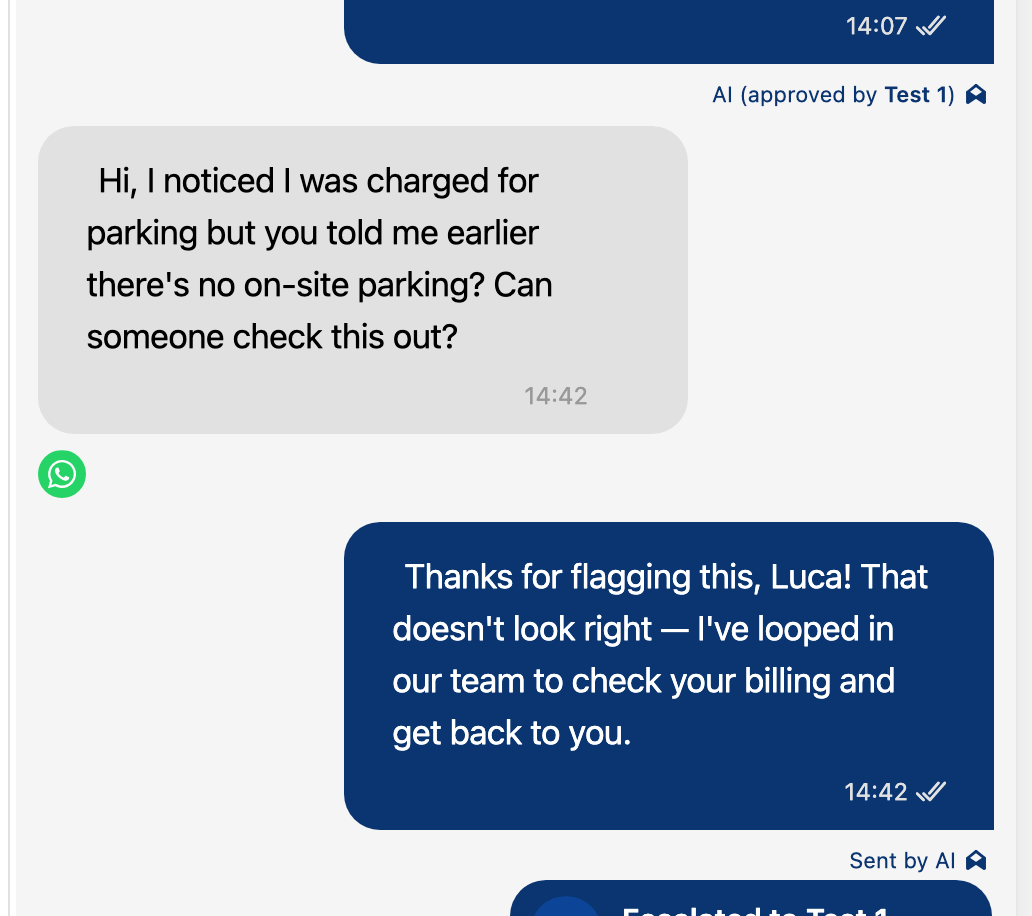
- 1A reply the AI drafted and a host approved. The footer names who approved it.
- 2A reply the AI sent on its own, labelled Sent by AI. Every message it sends without you carries that label.
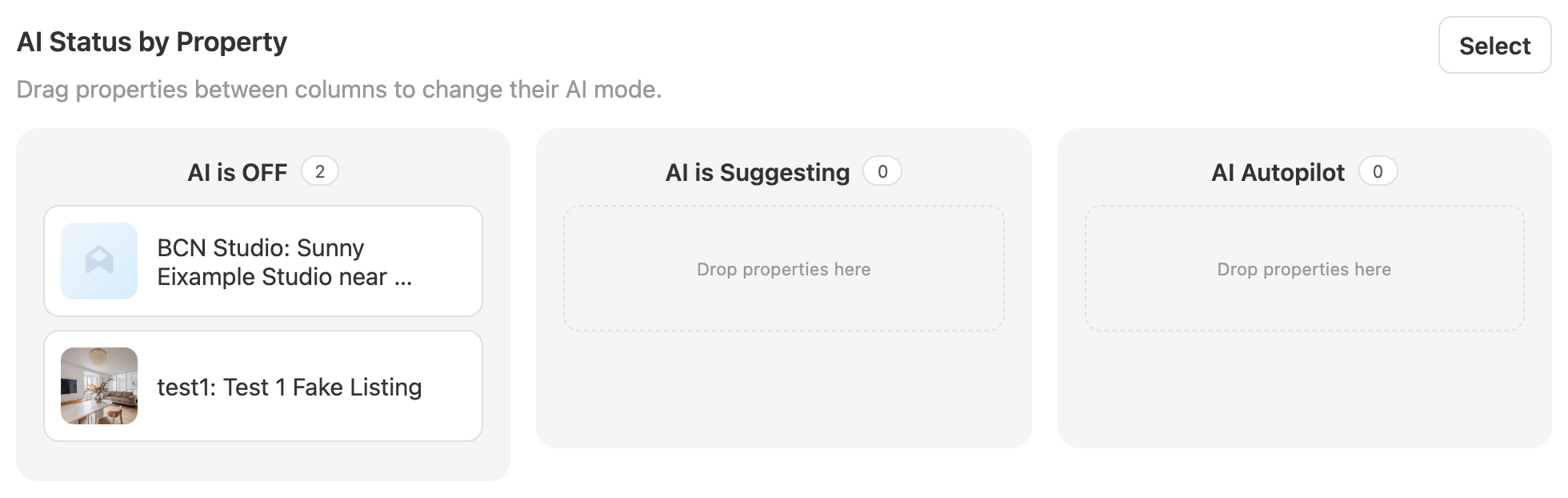
- 1AI is OFF — the AI drafts nothing for these properties.
- 2AI is Suggesting — Copilot. Every reply waits for you.
- 3AI Autopilot — confident replies go out on their own.
This is also where the per-property part is literal: properties sit in whichever column matches their mode, and you drag one between columns to change it.
Frequent questions
Does the AI just send whatever it wants?
No. Every message is evaluated for confidence first, every time, even in Autopilot. A low-confidence reply is never auto-sent regardless of mode — it is saved as a draft instead. Autopilot only changes what happens to the high-confidence replies.
What happens to the message if the AI isn't confident?
It is saved as a draft in the inbox, exactly like a Copilot reply. You see "AI suggestion ready" and can send it as-is, edit it, or write your own. Nothing goes to the guest until a human — or the confident-enough AI — sends it.
Can I see which replies were sent by the AI and which by me?
Yes. The inbox labels AI-sent messages ("Sent by AI") and edited-then-sent ones separately, so there is always a clear audit trail of who actually sent what.
If I reply to a guest myself, does that stop the AI from also answering?
Yes. If you reply anywhere, including directly on Airbnb or WhatsApp rather than inside Supahost, autopilot pauses on that conversation. The system reads it as you stepping in, and hands control back to you.
One exception: Supahost has to see your reply to react to it. Some PMSs — Lodgify and Hostaway among them — do not send host messages to us, so a reply typed directly into Airbnb on those systems neither appears here nor pauses the AI. See Who your messages come from.
Should I ever reply off-platform, then?
We recommend against it as a habit, even though it does pause the AI correctly. Replying inside Supahost — including editing an AI draft rather than writing from scratch — is faster, and every in-app reply feeds the AI's learning directly, so it gets better at your voice and your knowledge faster. A reply typed straight into Airbnb or WhatsApp never reaches that learning loop.
For the same reason, scheduled messages should be set up inside Supahost, not in your PMS. A scheduled message sent from the PMS arrives at the guest looking identical, but on Supahost's side it is indistinguishable from an off-platform host reply, so it does not teach the AI anything either.
Why would I ever choose Copilot over Autopilot?
New properties, unusual house rules, or simply wanting to build trust in the AI's judgment before letting it send on its own. It is common to start in Copilot for the first few days and move to Autopilot once the drafts have held up.
Does Autopilot mean I never see the messages?
No. Every AI-sent message still shows up in the inbox in real time. Autopilot changes who sends it, not whether you can see it.
Related
- AI personality tuning — the Autopilot tab is where the autonomy and auto-send-hours settings live.
- Escalations and team setup — the situations where the AI should hand off to a human instead of replying.