AI personality tuning
Open AI Settings → General to choose an AI personality.
You do not write a personality from scratch. You adjust three simple dials, plus optional per-channel and free-text layers, and the AI applies that voice to every reply it writes.
The screen is AI Personality, and you can create more than one. Each is named — the field is literally called "Hosting Name" — and then assigned to one or more listings. This is how a management company running several distinct brands handles it: one personality per brand voice, assigned across the relevant properties, rather than one setting per property.
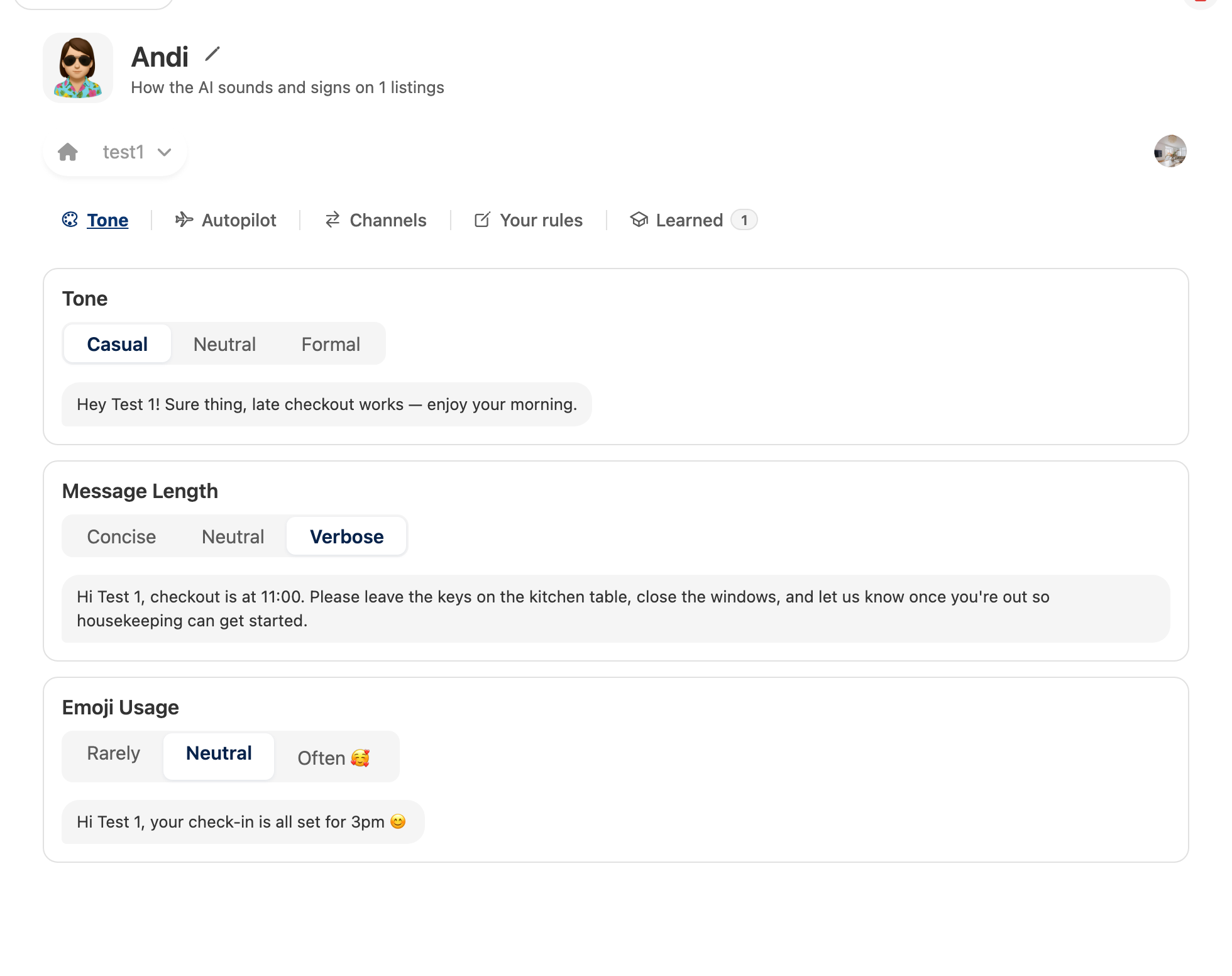
- 1Tone — Casual, Neutral or Formal.
- 2Message Length — Concise, Neutral or Verbose.
- 3Emoji Usage — Rarely, Neutral or Often.
- 4A live example under each dial, so you see the effect before you save.
The editor tabs
- Tone — three independent sliders, each shown with a live example message
so you can see the effect before saving:
- Tone: Casual / Neutral / Formal
- Message length: Concise / Neutral / Verbose
- Emoji usage: Rarely / Neutral / Often
- Channels — optional overrides per platform (Airbnb, Booking.com, and so on): a different sign-off name and extra rules that only apply on that one channel. This is for hosts who, say, sign as themselves on Airbnb but as "The [Company] Team" everywhere else.
- Autopilot — the autonomy and auto-send-hours settings. See Autopilot vs. Copilot.
- Your rules — a free-text box for anything the dials do not cover ("never offer a discount", "always mention the rooftop pool").
- Learned — instructions the AI has picked up on its own from past edits and corrections, shown as a running list.
Frequent questions
Is this one setting for my whole account, or per property?
Neither exactly — it is per personality, and a personality can be assigned to as many or as few listings as you want. If you have a uniform voice you need only one personality; if you run different brands, set up one per brand.
What if I want a completely different voice for Airbnb vs. WhatsApp?
That is what the Channels tab is for. It does not require a whole second personality, just an override on top of the base one for that specific channel.
Can I delete a personality once I've set one up?
Yes, but not while it is still assigned to any listing. The app blocks the delete and tells you which listings are still using it, so you cannot accidentally break messaging on a property by removing its personality out from under it.
How specific can I get, beyond casual/formal?
The "Your rules" free-text field is where specificity lives — house-voice quirks, things to always or never say. The three dials are meant to get most hosts to a good default fast; the rules box is the escape hatch for anything more particular.
Does the AI actually learn my style over time, or is it static once I set it?
Both. There are four layers to a personality, and it is worth being precise about which ones you control and which one the AI writes to itself:
- Personality/tone — the three dials (Tone, Length, Emoji), host-set.
- Channel-specific settings — per-platform overrides, host-set.
- Host rules — the free-text box, host-set.
- AI-learned settings — the only layer the AI itself writes to, based on watching you edit its drafts over time.
If the AI learns something wrong, am I stuck with it?
No. Learned instructions are not permanent or unremovable. Each one shows with an X next to it, and clicking it removes that specific learned instruction from the personality immediately. You do not have to correct the AI's behaviour indirectly by fighting it in the rules box — you can just delete the wrong learning directly.
I manage for several owners — should the name be theirs or mine?
Theirs, in most cases. The message is sent from the account that owns the listing, so a name of your own reads as a contradiction to the guest. Make one personality per owner, each carrying that owner's Hosting Name, and assign it to their listings. See Who your messages come from.
Related
- Knowledge base — personality is how the AI writes; knowledge is what it knows.
- Who your messages come from — the sending account versus the signing name, and why they should agree.