Guesty
Connecting Guesty lets Supahost read your listings, bookings and guest messages, and reply on your behalf. You do this once, for the whole account.
Connect it
-
In Supahost, open Apps, choose Guesty, and select Connect. A secure connection page opens in a new tab. It's hosted by our PMS integration partner, so the address bar shows a different domain — that's expected. Enter your details there and you'll be returned to Supahost. It asks for an API key, so leave it open.
-
In Guesty, open Integrations → Marketplace and search for Supahost. Select the blue Connect button to generate the key.
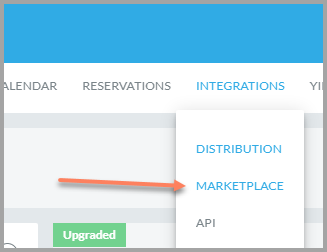
-
Copy the key Guesty shows you.
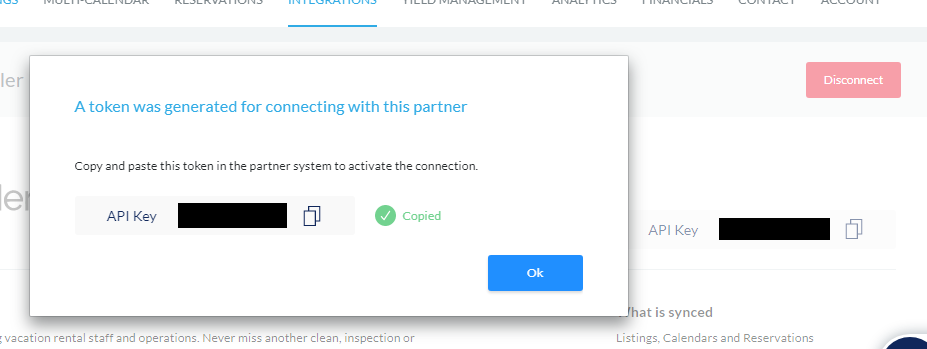
-
Paste it into the connection page and select Connect.
Supahost then brings your listings and bookings across. The first sync takes a few minutes; after that it keeps up on its own.
If you use Guesty's Open API instead
Some accounts connect through Guesty's Open API rather than the Marketplace. That route issues a client ID and a client secret, not the single key the Marketplace gives you.
- In Guesty, switch the top navigation to Setup mode and open Integrations → API.
- Hover over API Support, choose the three dots, and create your credentials.
- Copy both the client ID and the client secret. Guesty shows the secret once.
- Paste both into the Supahost connection page from step 1 and select Connect.
How updates reach Supahost
Guesty pushes changes to Supahost as they happen, so a new booking or a guest message appears without waiting for a refresh. There is an hourly refresh behind that as a backstop, so nothing is lost if a change is ever missed.
Related
- Connecting your PMS — what happens after any PMS connects, and how to disconnect one.